Markdown to PDF feature switches in one page
Every feature that can be switched off is in one document. Open it in the editor, turn the switches off one by one and compare.
Every opt-out in a single document. Open it in the editor, untick the feature checkboxes one by one, and convert again to compare.
Markdown source
Markdown · 45 lines# Feature toggles
Each block below exercises one toggle from the `features` request field. Turn them off and watch the page change.
Smart typography: "quotes", -- dashes, ... ellipsis (`smart_typography`).
```javascript
// syntax highlighting (highlight)
export const total = (lines) => lines.reduce((sum, l) => sum + l.amount, 0);
```
- [ ] A clickable checkbox (`tasks`)
- [x] A checked one
Emoji: 🚀 and :tada: (`emoji`).
Math: $\sum_{k=1}^{n} k = \frac{n(n+1)}{2}$ typeset, or left as source (`math`).
A diagram, vector art with `mermaid` on and the source as a code block with it off:
```mermaid
flowchart LR
a[on] --> b([off: code block])
```
A barcode (`barcode`) and an SVG icon (`svg`):
```barcode code128
TOGGLE-01
```
```svg
M12 2 L2 22 H22 Z
```
An embedded image (`images`), shown as its alt text with the toggle off:

An HTML block (`html_blocks`): <span style="color:#0f766e;font-weight:bold">styled with inline CSS</span>, printed as source with the toggle off.
A bare address that becomes a link (`bare_autolinks`): https://example.com/toggles
An indented block (indented_code) that is code with the toggle on
and a plain paragraph with it off.
Rendered pages
PDF · 1 page · 35 KB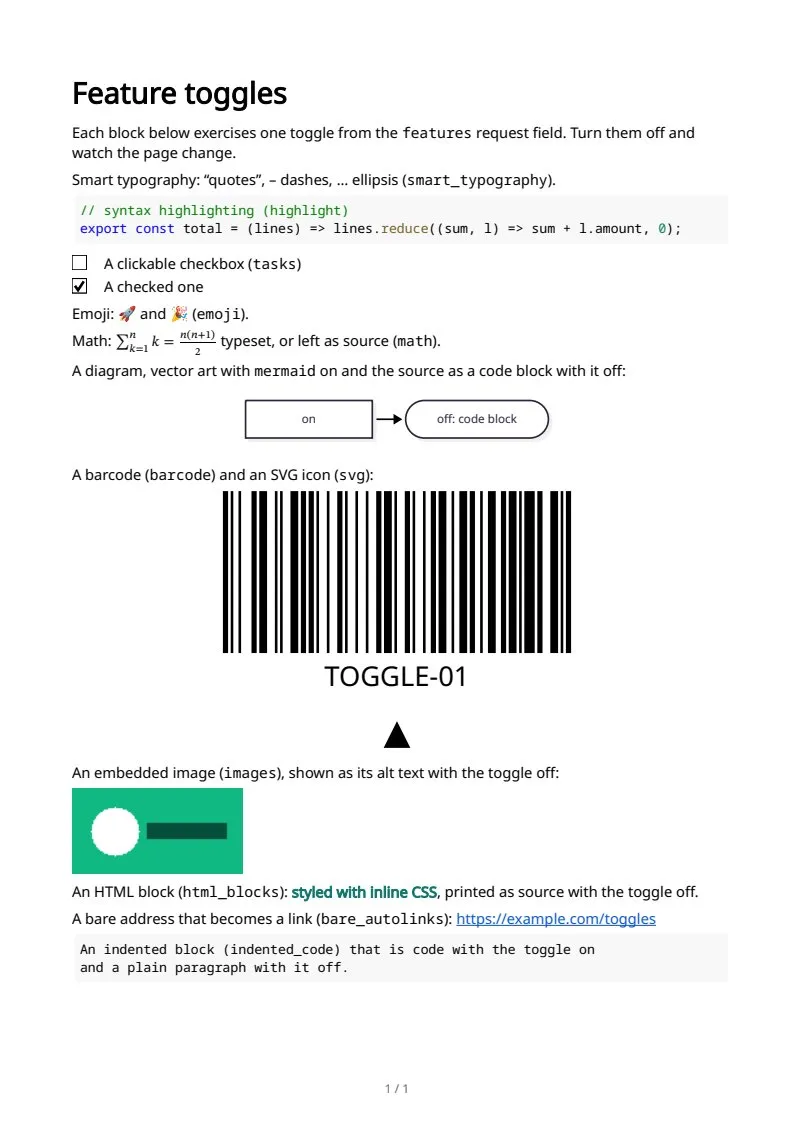
The sample documents describe invented organizations in several countries. All names and figures are illustrative.
Whole documents from Markdown to PDF: every sampleIn the Markdown reference