Mermaid git graph in Markdown to PDF
A release plan is drawn as a git graph, with branches, merges, highlighted commits and tags.
Branches, merges, highlighted commits and release tags for a mobile app's release train, with the main branch named in the init directive.
Markdown source
Markdown · 30 lines# Git graphs
```mermaid
%%{init: {'gitGraph': {'mainBranchName': 'main'}}}%%
gitGraph
commit id:"2.2.0 released" tag:"v2.2.0"
branch develop
commit id:"new onboarding screens"
branch feature/offline-maps
commit id:"tile cache"
commit id:"background sync" type:HIGHLIGHT
checkout develop
commit id:"translations: ja, pt-BR, ar"
checkout main
branch hotfix/crash-on-login
commit id:"guard null session"
checkout main
merge hotfix/crash-on-login tag:"v2.2.1"
checkout develop
merge hotfix/crash-on-login
checkout feature/offline-maps
commit id:"storage quota prompt"
checkout develop
merge feature/offline-maps id:"offline maps merged"
commit id:"release candidate"
checkout main
merge develop tag:"v2.3.0"
```
Commit labels are rotated so adjacent commits stay readable, and a highlighted commit marks the one worth talking about.
Rendered pages
PDF · 1 page · 10 KB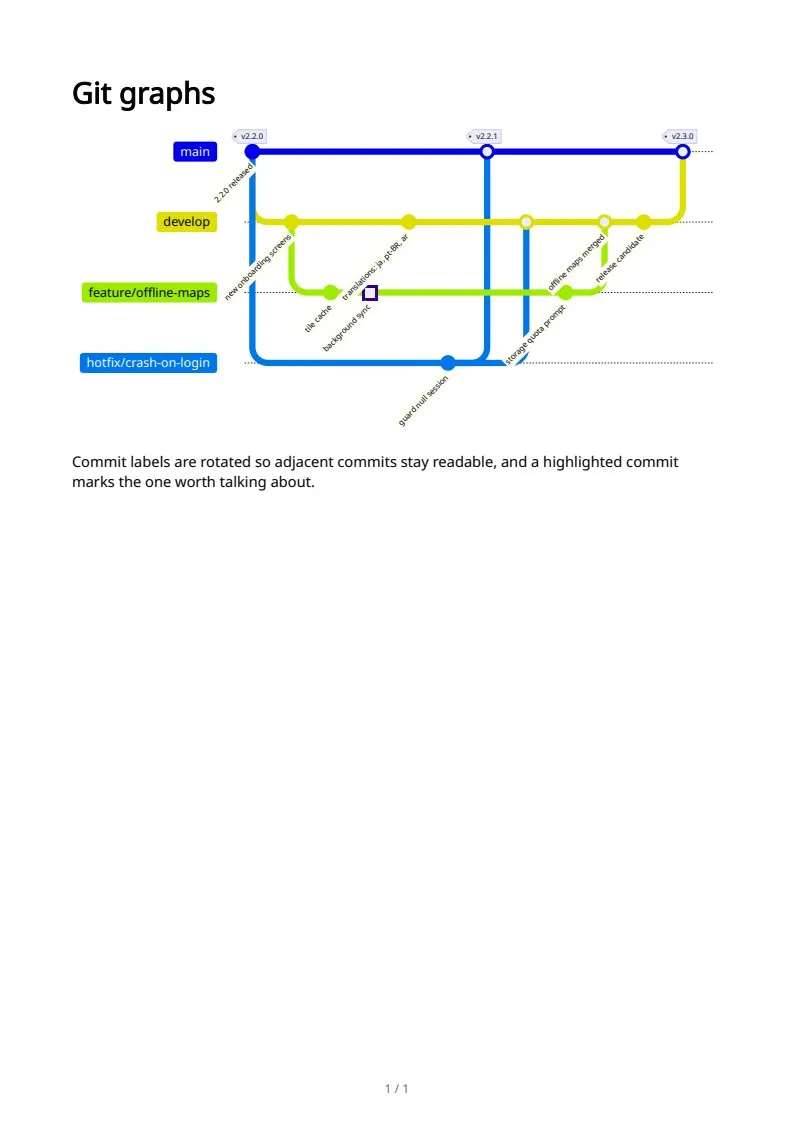
The sample documents describe invented organizations in several countries. All names and figures are illustrative.
Mermaid diagrams in Markdown to PDF: every sampleIn the Markdown reference